Who this is for.
Melbourne architects specifying lighting on a premium residential project. Builders coordinating the smart home stack on a new build. Homeowners trying to make sense of what KNX is and why their integrator keeps recommending it.
This is a field guide, not a marketing piece. It is long, because the topic deserves it. Skim the headings, drop in where you need.
The problem.
Lighting and automation decisions on a premium residential project lock in for the life of the home. Cabling lives in the wall. Programming lives in a project file. The platform you choose at design stage decides what the home can do for the next thirty years, who can service it five years on, and how cleanly it bridges to the front-end your family will actually use.
Most residential clients meet KNX for the first time mid-project, after the architect has already drawn the lighting plan. The decision is then squeezed into whatever cabling is left.
This guide is the version we wish landed on the architect’s desk before the lighting plan is drafted.
The solution.
A KNX wired backbone, specified at design stage, with the architect’s choice of keypad surface on top and the family’s preferred control surface at the front. Below is the full picture: what KNX is, what runs on it, how to specify it cleanly, where it bridges to Apple Home, and where it is not the right tool.
01 — What KNX actually is.
KNX is an open international standard for home and building automation. It is a wired bus, which means a single low-voltage cable carries the control signals between every device on the system. Lights, blinds, climate, sensors, switches, and gateways all sit on the same bus and talk the same protocol.
The standard is governed by the KNX Association, a Brussels-based consortium of more than five hundred manufacturers. Every certified KNX device, regardless of brand, is interoperable. A Basalte switch made in Belgium will talk to a Theben dimmer made in Germany, talk to a Hager actuator made in France, and talk to an Ekinex sensor made in Italy. None of them care who made the others.
KNX has been the standard for serious residential automation in Europe since 1990. In Australia, adoption has lagged. Most installers learned on Lutron HomeWorks, C-Bus, or Dynalite, and never moved past those platforms. The local KNX bench is real, but smaller than it should be for the size of the market.
02 — Why we run it underneath.
Three reasons. The same three we walk through in our Lutron control systems guide for Melbourne residential, framed differently here.
First, the standard is open. No single manufacturer can kill it. No corporate pivot can deprecate it. A KNX device made in 2026 will speak to a KNX device made in 2040, because the protocol cannot be unilaterally changed by a manufacturer with a quarterly earnings call.
Second, the wired bus is robust. KNX runs on a dedicated low-voltage twisted-pair cable, separate from the mains. It does not depend on Wi-Fi, it does not depend on internet, it does not depend on a cloud server in another country. When the NBN drops out, the lights still respond. When Apple Home goes offline for an afternoon, the dimmers do not.
Third, the integration story is mature. KNX bridges to Apple Home, Home Assistant, Control4, Basalte Home, and almost every modern front-end through well-documented gateways. The integration is not a custom hack. It is a published standard.
03 — What goes on the bus.
A typical KNX install in a Melbourne residential project covers the following layers.
Lighting. Every dimmer, switch actuator, and DALI gateway on the bus. Scenes, schedules, circadian rhythm, daylight harvesting, presence-based control, all programmed against the bus.
Blinds and shading. Motorised blind controllers, awning actuators, external louvre drives, all on the bus. Blinds become part of the same scene logic as the lighting.
Climate. Daikin, Mitsubishi, and other ducted systems integrate to KNX through manufacturer gateways. Setpoints can live on the wall, in Apple Home, or in a Basalte Lisa keypad. Heating circuits, hydronic underfloor zones, and bathroom heat controls all sit on the bus.
Presence and ambient sensors. Movement, occupancy, temperature, humidity, illuminance, and CO2 sensors feed the bus. The system does not just respond to button presses. It responds to the room.
Keypads and wall surfaces. Basalte, Ekinex, Lithoss, Hager Silhouette, Core Smart Home. The architect picks the surface. The function is the same.
Visualisation gateways. A KNX IP gateway pushes the bus state to Apple Home, Home Assistant, or whichever control surface the family uses.
The bus is the common nervous system. What sits on top is interchangeable.
04 — Specifying KNX at design stage.
If you are an architect drawing a new build, the most useful thing you can do is involve us before the lighting plan is finalised. The reason is simple. KNX cabling lives in the wall. Once the plaster is on, options narrow to whatever the existing cable runs allow.
A typical pre-design conversation covers the following.
Bus topology. Where the KNX backbone runs, where the line couplers live, how the segments are zoned. Done well, the bus is invisible to the architect's plan. Done badly, the bus head end becomes a service-cupboard problem.
Cable schedule. Every dimmable circuit, every keypad location, every motorised blind, every climate zone. We document it before the sparkies pull a single metre.
Keypad layout. Less is more. We work with the architect on plate locations, sight lines, and the count per zone. The brief is calm walls. Not a touchscreen on every column.
Scene logic. What does the family want to happen at 6am, 6pm, midnight, when the front door opens, when the last person leaves the room. The scene logic gets sketched at design stage, not the day before commissioning.
05 — How KNX bridges to Apple Home.
This is where most of the questions land. You want Apple Home as the family-facing platform. KNX as the backbone underneath. How does the bridge actually work?
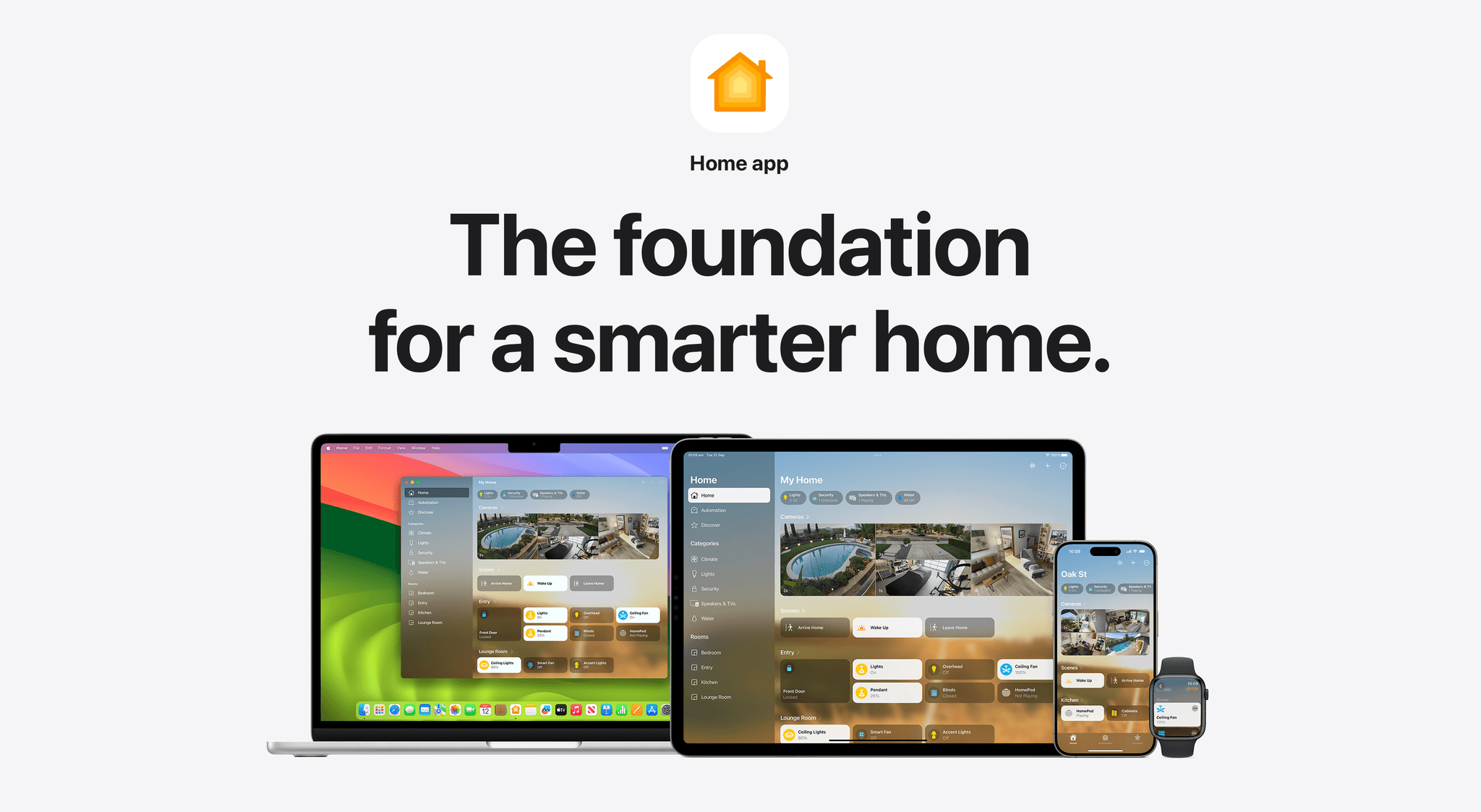
The current best practice in 2026 is a KNX IoT gateway, paired with a HomeKit-certified KNX hub or, more often, a Home Assistant instance running the KNX integration. The hub maps every KNX address to a HomeKit accessory. Lights become bulb accessories. Blinds become window-covering accessories. Scenes become HomeKit scenes. Sensors become HomeKit sensors.
The Apple Home app sees a flat list of accessories. The user does not need to know KNX exists. They just see Living Room Pendants. Dim 60%. Done.
When the family wants more control surface than Apple Home alone provides, we layer Basalte Home or Control4 on top. Both ride on the same KNX bus underneath. Same scenes, same logic. Different paint.
06 — Where KNX runs out.
KNX is not the right answer for every layer of every project. Three exceptions worth naming.
Whole-home audio. Audio distribution does not belong on KNX. We run Sonos, Sonance, WiiM, or Triad, AirPlay native, with the audio platform handling its own zoning and control. KNX touches it only to trigger zones in scenes (e.g. "Sunday Morning" turns on the kitchen audio at 7am).
Cinema. A reference cinema room runs Trinnov or Marantz processing, separate AV control, and lives on its own automation island. KNX triggers the cinema mode from the rest of the house, but the cinema itself is not a KNX zone.
Security panel logic. Inception by Inner Range handles its own zone logic, panic, glass break, and access. We bridge state into KNX and Apple Home for visibility, but the security panel runs its own world.
The principle: KNX is the bus, but it is not the only bus. The job is integrating multiple specialist systems cleanly through it, not forcing every layer onto KNX because the protocol theoretically supports it.
07 — Documentation. The deliverable architects notice.
The single thing that separates a good KNX install from a great one is the documentation that ships with it.
Every Elec Reid KNX install ships with the following.
- Head end schematic. Bus topology, line couplers, gateway IP addresses, every actuator labelled.
- Cable schedule. Every cable run, terminated, tested, recorded.
- KNX project file (ETS6). The full programmed project, archived and supplied to the client.
- Scene index. Every programmed scene, with its trigger logic and component states.
- Network map. The IP and KNX layers cross-referenced.
- Handover pack. A printed and digital copy of the above, for the family and any future integrator.
We have had architects tell us our documentation is better than the architect's drawings. That is the standard we hold.
08 — Frequently asked questions.
Is KNX more expensive than Lutron or Dynalite?
Comparable on parts, more expensive on programming labour, less expensive on lifecycle. The first install costs slightly more. The next twenty years cost less, because there is no platform lock-in and the integrator pool is wider.
Can KNX be retrofitted?
Yes, with caveats. Wireless KNX-RF segments exist for cases where running cable is impossible. They are reliable, but more expensive per device than wired KNX. Most retrofits are partial. We design hybrid wired-and-wireless bus topologies for renovation projects regularly.
Will KNX work with my existing Apple Home setup?
Yes. The KNX bus bridges to Apple Home through a HomeKit-certified gateway. Your existing HomeKit accessories continue to work alongside KNX-controlled accessories.
What happens if Elec Reid is no longer here in fifteen years?
The KNX project file (ETS6) is the universal handover format. Any KNX-certified integrator anywhere in the world can open the file, read the project, and continue maintenance. That is the whole point of an open standard.
Do you do KNX programming yourselves, or sub-contract it?
In-house. We are KNX programmers. Every Elec Reid KNX project is programmed by our team, not handed to a third-party integrator.
09 — Where to start.
If you are at design stage on a Melbourne residential project, the best time to involve us is before the lighting plan goes to print. We will walk the project with the architect, scope the bus topology, and produce a written specification that the builder can quote against.
Tell us about your project or call +61 450 342 075. We work across Melbourne and the Mornington Peninsula, and we are always happy to speak with architects and builders at the design stage.
The best time to involve us is before the walls go up.
Tags